
- VLAN
- Network Basics
- Network Security
VLAN Basics: Why We Split One Switch Into Many
By Pivithuru Milan Perera5 min read
- One switch, one broadcast domain
Start with the simplest possible network: a handful of PCs and a server, all plugged into the same switch.
Every device can talk to every other device directly. In networking terms, they all share one broadcast domain, there's nothing in the switch stopping any port from reaching any other port.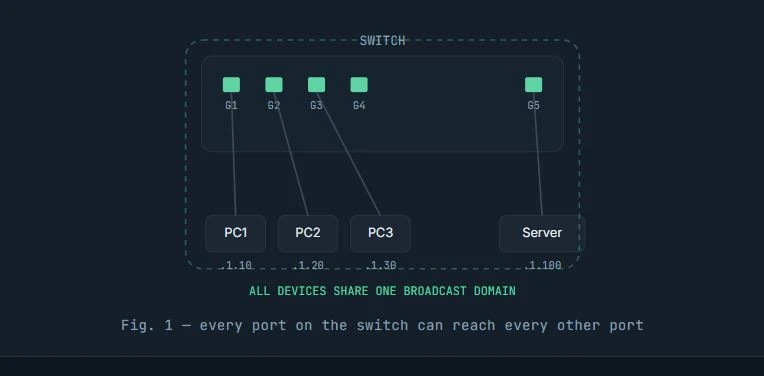
- The problem: departments don't mix
Now picture a company with Finance, HR, and Engineering, all plugged into that same switch. Without anything to separate them, every PC can see every other PC's broadcast traffic. Unless a firewall sits in between, they're effectively one flat, insecure network.
The risk: flat networks mean a compromised laptop in one department can probe, scan, or sniff traffic destined for another, there's no wall between them.
- VLANs: one physical switch, many virtual ones
A VLAN (Virtual LAN) lets a single physical switch behave like several independent switches. Ports get assigned to a VLAN, and traffic only flows between ports in the same VLAN — even though the cabling is identical to before.
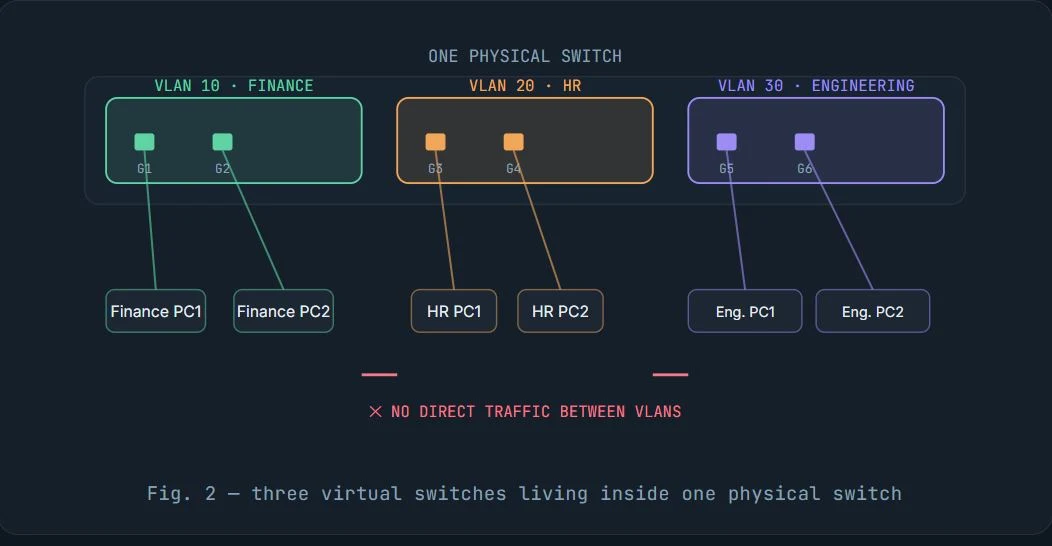
Even though Finance, HR, and Engineering share the exact same physical box, Finance can't reach HR, HR can't reach Engineering, and Engineering can't reach Finance unless something like a router or firewall is explicitly told to allow it.
Think of it like an apartment building. Without VLANs it's one giant room where everyone hears everyone. With VLANs, each department gets its own apartment with its own walls, same building but separate spaces.
- VLAN IDs
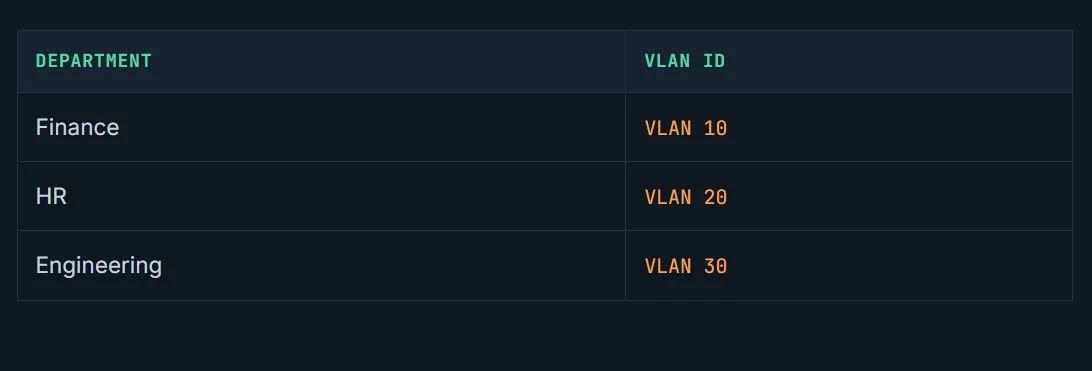
Every VLAN is identified by a number from 1 to 4094. In the example above:
- Port assignment & what a VLAN tag actually is
Inside the switch, each port is assigned to a VLAN. When a frame arrives on Port1 (VLAN 10), the switch only forwards it to other VLAN 10 ports and never to VLAN 20 or VLAN 30.
Between VLAN-aware devices (switches, firewalls), that VLAN membership needs to travel with the packet frame over a shared cable, because VLAN aware devices should be able to understand which VLAN this packet came from, therefore packet frame will be attached with a VLAN ID. That's what a VLAN tag is: a small field inserted into the Ethernet frame that says, literally, "I belong to VLAN 20."
When a frame is sent to a VLAN-unaware device, the switch removes the VLAN tag on the outgoing port and forwards the original Ethernet frame. Similarly, when an untagged frame arrives at a switch port, the switch assigns it to a VLAN based on the inbound interface and then adds the appropriate VLAN tag.
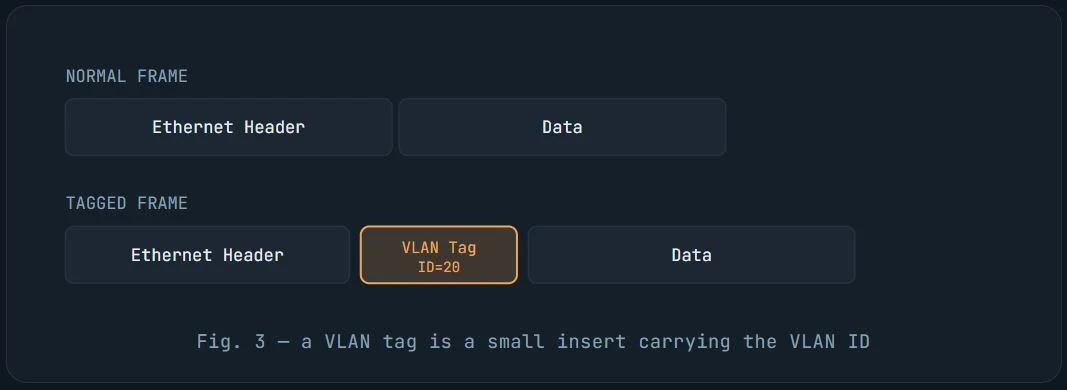
For example, a regular PC is unaware of VLAN tagging; it simply sends standard Ethernet frames. The switch determines which VLAN each frame belongs to based on the port where the frame arrives.
- Access ports vs. trunk ports
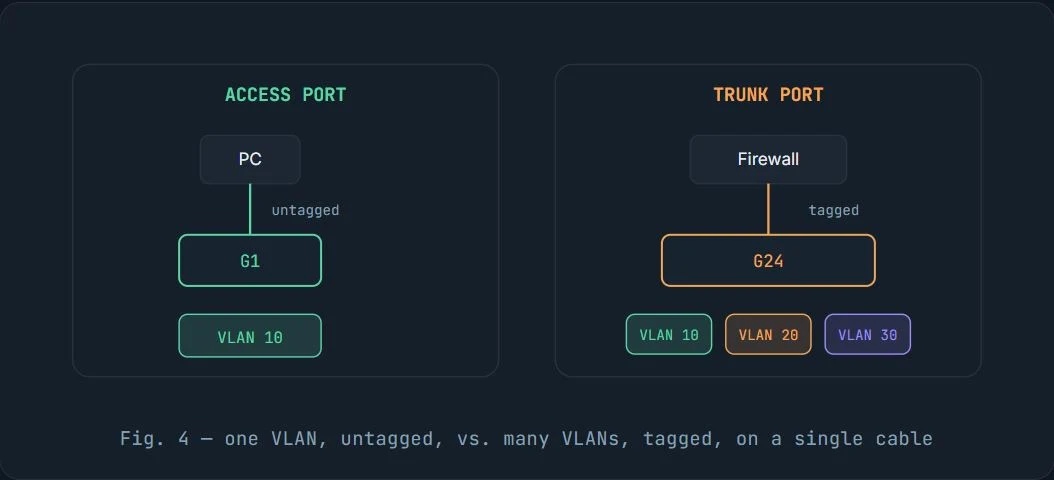
- Access port: carries traffic for a single VLAN without tags. It is typically used to connect end devices such as PCs. The switch adds the VLAN information internally when traffic enters the port and removes it before sending traffic out, so the PC never sees a VLAN tag.
- Trunk port: carries multiple VLANs at once over a single cable, each frame tagged with its VLAN ID. This is what connects switches to switches, or a switch to a firewall.
- PVID: what happens to an untagged frame on a trunk?
PVID stands for Port VLAN ID. It answers one specific question: "If an untagged frame shows up on this port, which VLAN do I put it in?"
On an access port, the PVID is straightforward: it matches the port’s single VLAN. On a trunk port, the PVID is used when untagged traffic arrives, such as management traffic or frames from a misconfigured device. It gives the switch a default VLAN to place that traffic into.
Keeping the PVID as VLAN 1 on a trunk is common because it gives untagged frames a consistent destination, often for switch management, while leaving tagged VLAN traffic such as 10, 20, and 30 unaffected.
- Putting it together: a full example
Consider this practical example: a firewall sends three VLANs to a managed switch through a single trunk link, while each department connects through its own access port.
Traffic flow, step by
step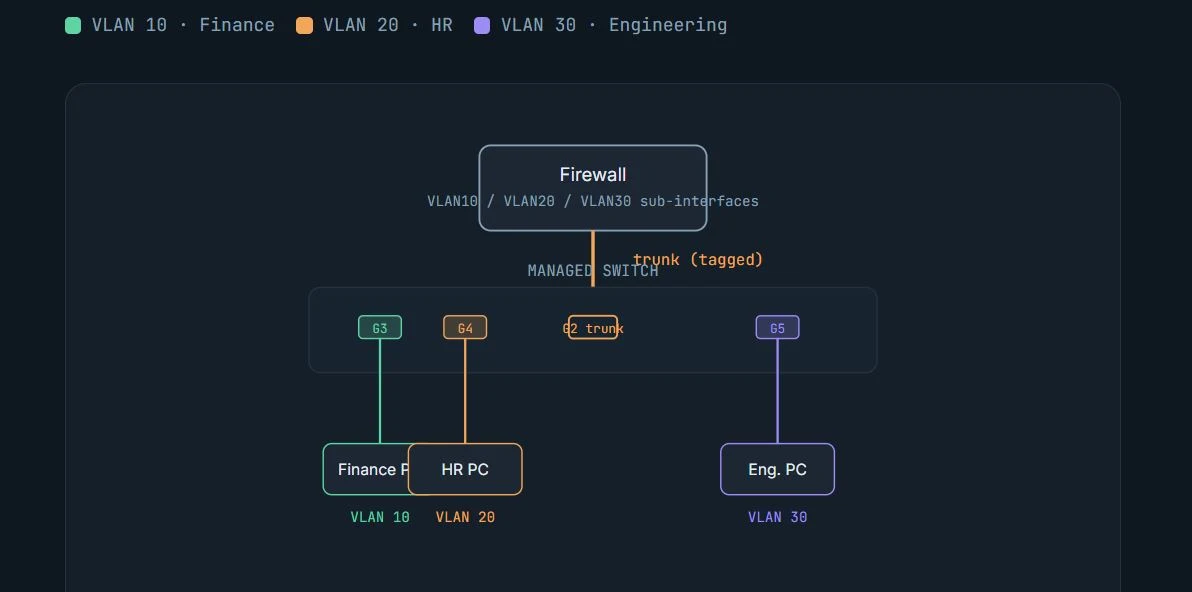
- The Finance PC on G3 sends a plain, untagged Ethernet frame.
- G3 is an access port for VLAN 10, so the switch internally marks that frame as VLAN 10.
- Forwarding it out G2 (the trunk), the switch adds a VLAN 10 tag.
- The firewall reads the tag and hands the frame to its VLAN 10 interface.
- The reply comes back tagged VLAN 10.
- The switch receives it on G2, recognizes VLAN 10, forwards it to G3, and strips the tag before it reaches the PC.
The PC never sees a VLAN tag at any point. Tags only exist on the wire between VLAN-aware devices switches, firewalls... etc.
Once this mental model is solid, the next layer, inter-VLAN routing, native VLAN edge cases, and configuring VLAN sub-interfaces on a firewall, is mostly just applying these same rules in more places.
Keep reading
More articles
Explore other writeups on network security, firewalls, and practical engineering.

Reflecting on My BSc (Hons) in Information Technology Specializing in Computer Systems & Network Engineering at SLIIT (2021–2025)
When I look back at my journey starting from July 2021 all the way to completing my final requirements, enrolling in the BSc (Hons) in Information Technology specializing in Computer Systems and Network Engineering (CSNE) at the Sri Lanka Institute of Information Technology (SLIIT) was one of the most defining choices of my professional life.
The Hidden Vulnerabilities of Public Wi-Fi: Why Open Networks Are a Trap
Ever logged onto a coffee shop's "free" Wi-Fi and did your office work while enjoying a good cup of coffee freely and happily, did you feel completely safe on free Wi-Fi? Think again. Behind that open connection lies a silent playground for hackers where passwords don't even need to be cracked, because your active sessions are stolen in plain sight. Discover why multi-factor authentication isn't enough and what you can do right now to protect your data before your next public login. Read the full post to uncover the hidden traps of unsecured networks!
Urgent Security Alert: Active Exploitation of SonicWall SMA1000 Vulnerabilities Threatens Enterprise Infrastructures
Enterprise environments are facing significant security threats after the confirmation that ransomware operators are actively exploiting two high-severity zero-day vulnerabilities affecting SonicWall Secure Mobile Access (SMA) 1000 appliances.
Why CCNA, CCNP, AWS, Azure, and ISC2 Certifications Are Important for IT Professionals (Part 2).
with AI tools automating more technical work, do certifications still carry weight? The data says yes, and arguably more than before. Read the Part 2 of our previous conversation about certification courses.